
Learn how BullionVault works
Here we explain the basics of the BullionVault user interface. If you want to understand how you get better prices you should also check out our FAQs.
Order entry
Before looking at the different order boards it's worth getting the hang of the order details panel.
You'll need to be logged in to see the order details panel on the right side of your screen.
The Order Details
Clicks in many different places on screens cause order details to be automatically filled out with sensible guesses at what you want to do. This makes it very easy to fill out your orders, and often all you have to do is look carefully at the order we generate from your click, and confirm.
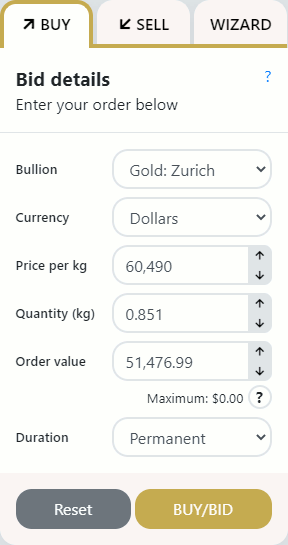
Confirming an order
Your order details are offered for your confirmation. Only when you confirm does your order get passed to the market for validation, matching and/or posting on the order board.
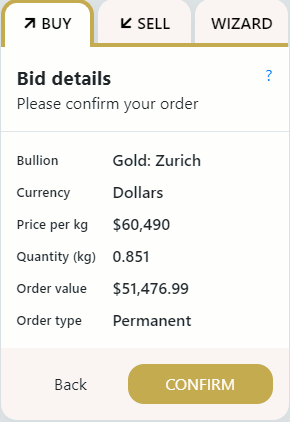
Were you successful?
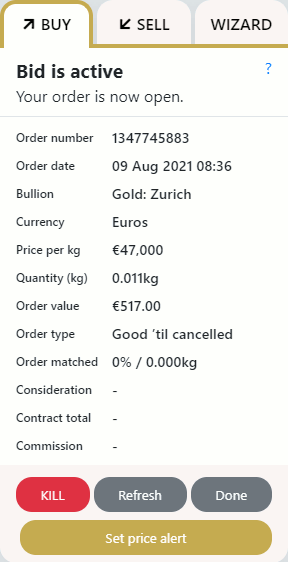
Don't rush off just yet! When you confirm an order one of three things could happen.
- Your order fails validation.
- Your order executes in its entirety
- Some or all of your order can't be executed, and what's left is posted as a limit on our order board [shown here].
You need to read the response to see which one of these occurred.
If you are not sure what has happened go and check your open orders on the orders menu.
The Order Wizard
The wizard offers a different route to filling out your order.
It lets you fix one variable in an order, and works out suggestions for the others.
For example, you could set the wizard to 'fix my order value' setting it at $1,000. The wizard checks the market and sees how much you should bid for, and what price you should offer.
Press the 'Suggest' button and the optimal results are displayed - if possible. If you like the suggestion you press 'Proceed' and the wizard drops you into the buy/sell panel, ready to trade and confirm.

The Order Board Screens
As well as the main Order Board, there are two other views of the open orders available on BullionVault's markets: Market depth and Market spreads. You can reach them from the Views dropdown menu on the Order Board
When you're logged in they all have the order details panel on the right hand side.
Broadly what happens is when you click something on the order board (left side of screen) the system has a guess at what you mean to do and fills out the order details (right side). You get a one or two click order entry, which allows you to grab an opportunity as soon as it's displayed, usually without having to carefully type lots of stuff in.
When you submit an order we explain to you what your order details will achieve. You have to confirm this for us to proceed and process your order.
Market Order Board
Get there by pressing BUY/SELL.

The order board is where all competing users advertise their prices to you.
Remember, even though people using the system are often private individuals buying and selling their own bullion, it is professional good delivery gold, silver and platinum and it's already stored in a professional market vault. It has all the guaranteed integrity of an accredited bullion market bar. BullionVault guarantees this so you are quite safe to deal with any other member.
The screen is arranged so that you can quickly see what the best available prices are (the ones on the buttons) and how much gold, silver or platinum, in kilograms or troy ounces, can be traded at that price.
The Weight Units filter can be used to choose between kilograms and troy ounces, and the prices update every few seconds. The quantity you see is the maximum available at the price.
You can deal any amount up to that maximum, and if you want to deal more just increase the quantity on your order. Then what can't immediately be dealt will be advertised at your limit price to people who want to deal the other way - as a new quote on the board. You can deal in any US Dollars, British Pounds and Euros in any of five vaults and in Japanese Yen in one vault. Silver is available in four vaults and platinum in one vault, in the three standard currencies. That's why there can be as many as thirty two lines of prices on the order board, depending on what you have it set to display. So - for example - if you want to use your deposited dollars to buy the cheapest gold in Zurich you simply click the gold button on the line marked "$ Dollars / Zurich", and the system loads your order for you to press the BUY/BID button and CONFIRM.
Most people are interested mainly in one currency, or one vault. Use the Edit markets button to control which vaults and currencies you see and so focus on the markets you're interested in.
The system checks you have sufficient available resources to place your order. So when you buy gold from someone else's quote BullionVault has already checked they have enough gold to transfer to you at the instant of that trade. (You have to have enough money too!)
Because we give away a small promotional balance sometimes the best prices are in tiny quantities - irrelevant for serious users. If you find this just set the 'Min order size' box to something like 0.01kg, and press Go to filter out the learners.
Market Depth
Get there by pressing BUY/SELL and selecting Market depth from the Views dropdown menu.
This graphical representation of orders shows you how much bullion you can buy at various prices.

A deeper market is one in which you can buy or sell more bullion. The longer the yellow lines the more gold (lines for silver are grey, and lines for platinum are blue) there is about hoping to be bought. The longer the green lines the more cash there is about, chasing gold.
The most competitive prices are only available for a limited quantity of bullion, next to the middle grey line on the screen. As the terms improve for your prospective counterparties the quantity of bullion you can trade (the depth) increases too. In other words if you'll pay a bit more you can buy more and if you'll accept a bit less you can sell more.
Pay particular attention to the cumulative and logarithmic scales of this graphic.
- The cumulative figure means that for each new price - away from the central grey strip - the depth includes all more competitively priced bullion.
- The logarithmic scale means that each additional increment on the horizontal scale increases the market depth by 10. This allows the screen to show scales from a few grams to 100 kilograms.
This view can be a useful indicator of likely future price moves. The current price is what you can trade at now, but if this chart is predominantly yellow it shows lots of gold being offered, and not much cash being offered. The market is awash with gold at the current price. The chances are that the green (cash) being offered by buyers will run out before the yellow (bullion) being offered by sellers, indicating a likely price fall. Conversely if the chart is predominantly green - indicating the market is awash with cash - the suggestion is that the price will rise.
The result of clicking the appropriate horizontal bar is the filling of order details at a price sufficiently high to buy that quantity of bullion, or sufficiently low to sell it.
Market Spreads
Get there by pressing BUY/SELL and selecting Market spreads from the Views dropdown menu.
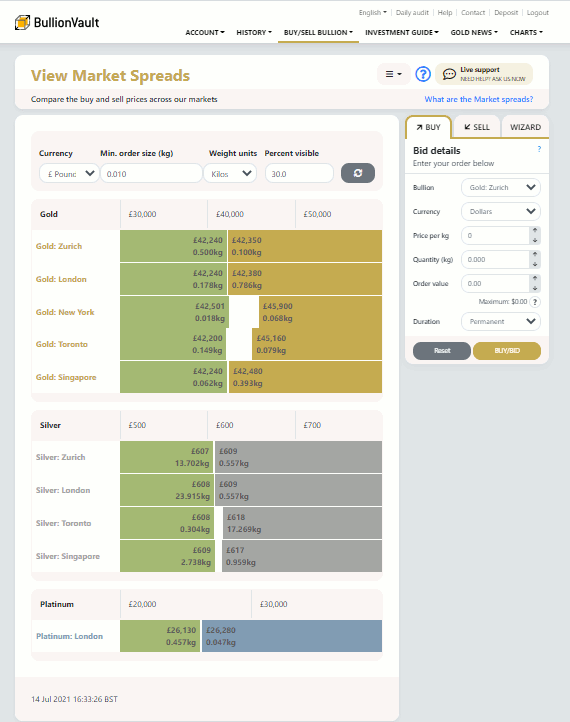
This screen gives a simple graphical representation of the price of gold, silver or platinum in a given currency at different locations. The more competitive locations have narrower white gaps between bid and offer prices for bullion.
For the cheapest gold click on the yellow bar with the leftmost (lowest) offer price, and for the highest selling price click on the rightmost green bar.
When you click the relevant order details are filled out to match exactly with the opportunity that's available. Not surprisingly when the white gaps slim down it can become a clicking race to pick up the bargain.
Remember, you can buy the bullion in any location, but you can only sell it in the location(s) in which you have it available. Similarly you can sell your bullion for any currency, but you can only buy it with a currency you have available. Don't worry too much though - if you click to trade against something you can't deliver (either for cash or for metal) the system rejects your order and no harm is done.